How to simulate quantum dynamics with Fire Opal
Learning the basics of running a dynamics simulation with simulate_dynamics
Fire Opal's simulate_dynamics function is designed to simulate the time evolution of a supported many-body model directly on quantum hardware. Unlike circuit-based workflows, you do not provide a quantum circuit. Instead, you define the physical model, the initial state, the simulation parameters, and the observables you want to measure.
In this user guide, you will learn how to configure these inputs, submit a simulation, and retrieve the resulting expectation values. A small one-dimensional Fermi-Hubbard example is used to keep the focus on the workflow rather than the underlying physics.
Summary workflow
The general workflow for using simulate_dynamics is:
- Import Fire Opal and configure your credentials.
- Choose a supported quantum backend.
- Define the model, initial state, time evolution, and observables.
- Run the simulation with
simulate_dynamics. - Retrieve and inspect the expectation values.
1. Imports and initialization
Import Fire Opal and the data types used to define the simulation.
import numpy as np
import matplotlib.pyplot as plt
import fireopal as fo
from fireopal.types import ModelType, SimulationType, SparseOccupationOperators
import qctrlvisualizer as qv

plt.style.use(qv.get_qctrl_style())
If you experience an error while attempting to import the above libraries, please run the following command using the terminal. Please note that after installing new packages, you will need to restart your notebook session or kernel for the newly installed packages to be recognized.
%pip install fire-opal matplotlib qiskit-ibm-runtime qctrl-visualizer qiskit qiskit_qasm3_importAuthenticate your Q-CTRL account and create the credentials for your hardware provider. This example uses IBM Quantum.
# Authenticate your Q-CTRL account.
api_key = "YOUR_QCTRL_API_KEY"
fo.authenticate_qctrl_account(api_key=api_key)

# Create IBM Quantum credentials.
token = "YOUR_IBM_CLOUD_API_KEY"
instance = "YOUR_IBM_CRN"

credentials = fo.credentials.make_credentials_for_ibm_cloud(
    token=token, instance=instance
)
Q-CTRL authentication successful!
2. Choose a backend
Use show_supported_devices to list the backends available through the credentials you provided. Select one of the returned backend names for the simulation.
supported_devices = fo.show_supported_devices(credentials=credentials)[
    "supported_devices"
]

for device in supported_devices:
    print(device)
ibm_boston
ibm_marrakesh
ibm_phoenix
ibm_pittsburgh
ibm_kingston
ibm_miami
ibm_fez
backend_name = "ibm_phoenix"
shot_count = 2048
3. Define the simulation
simulate_dynamics uses four inputs to describe the dynamics problem: the model, initial state, simulation parameters, and observables.
For this example, consider a four-site one-dimensional Fermi-Hubbard chain with hopping amplitude $t_h=1$, no on-site interaction, and zero chemical potential. A single spin-up fermion starts at site 0 and is allowed to evolve across the chain.
The initial state is written as one character per physical site. The supported local occupations are e for empty, u for spin up, d for spin down, and b for both spins occupied. The rightmost character represents site 0, so eeeu places one spin-up fermion at site 0.
site_count = 4

model = ModelType(
    hopping_amplitude=1.0, on_site_interaction=0.0, chemical_potential=0.0
)

simulation = SimulationType(time_step=0.2, step_count=8)

initial_state = "eeeu"

observables = [
    SparseOccupationOperators(operators=[[("Nup", site)]], coefficients=[1.0])
    for site in range(site_count)
]
The observable list measures the spin-up occupation $\langle n_{i\uparrow}\rangle$ at each site. Each SparseOccupationOperators object defines one observable, and the order of the list determines the order of the returned expectation values.
4. Run the dynamics simulation
Pass the problem definition and execution settings directly to simulate_dynamics. Fire Opal constructs and runs the required quantum circuits internally.
job = fo.simulate_dynamics(
    model=model,
    initial_state=initial_state,
    simulation=simulation,
    observables=observables,
    shot_count=shot_count,
    backend_name=backend_name,
    credentials=credentials,
)

print("Job submitted.")
Job submitted.
job.status(){'status_message': 'Job has finished successfully.',
'action_status': 'SUCCESS'}
5. Retrieve the results
simulate_dynamics returns a Fire Opal job. Call result() to retrieve the completed simulation output. The observable_expectation_values entry contains the time series for the requested observables.
result = job.result()

expectation_values = np.asarray(result["observable_expectation_values"], dtype=float)

print("Provider job IDs:", result["provider_job_ids"])
print("Expectation-value array shape:", expectation_values.shape)
Provider job IDs: ['datgoulvr3kc73elfqh0', 'datgoutvr3kc73elfqhg']
Expectation-value array shape: (4, 9)
6. Visualize the dynamics
Plot the occupation of each site as a function of simulation time. At the beginning, the spin-up fermion occupies site 0. As the system evolves, the hopping term redistributes its occupation across the chain.
times = np.arange(expectation_values.shape[1]) * simulation.time_step

for site, values in enumerate(expectation_values):
    plt.plot(times, values, marker="o", label=f"Site {site}")

plt.xlabel("Time")
plt.ylabel(r"$\langle n\_{i\uparrow} \rangle$")
plt.title("Spin-up occupation dynamics")
plt.ylim(-0.05, 1.05)
plt.legend()
plt.tight_layout()
plt.show()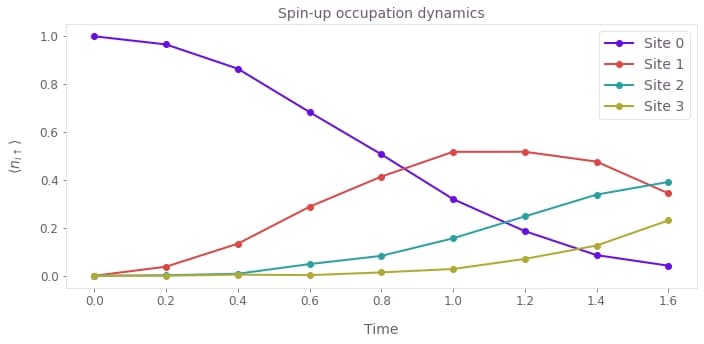
Next steps
The execution pattern remains the same for larger simulations. To adapt this example, change the model parameters, provide the desired Fock-state string, adjust the time step and number of steps, and define the occupation observables you want to measure. The call to simulate_dynamics does not require you to construct, transpile, or submit the underlying quantum circuits yourself.
